
QuickBooks Online and Constant Contact

Sync your records to QuickBooks Online with Constant Contact and vice versa, segment your records to lists in Constant Contact and do all your imports and exports automatically.
See what you can do There is no limit to the things you can create with the Constant Contact for QuickBooks Online integration! Better campaigns, unparalleled insights, bidirectional data flows, cooperation between departments -- all these and many others are just a click away.
Sync QuickBooks Online contacts to Constant Contact Lists.
The customer is automatically created in QuickBooks Online if the email address does not exist at the time of sync.
Remove inactive or deleted Customers from Constant Contact.
Custom field mapping between both systems.
Opt-Outs managed automatically.
QuickBooks Online always takes higher precedence over Constant Contact. Any data changes in QuickBooks Online will always be synced to Constant Contact.
Contact data is synced from Constant Contact only if the email address doesn't exist in QuickBooks Online at the time of syncing.
Seamless CRM to Marketing Integrations SyncApps Pricing We killed pricing tiers! All features.
One Plan. $150/month
One Plan Everything we’ve built over the last 15+ years is now included. No locked features. Just sync and grow.
$ 150 .00 / month
Access to all SyncApps features
25 integrations Want more?
Unlimited team members
Sync unlimitted records/month
Real-time syncing (every 2 minutes)
Manual sync anytime (on demand)
Run 25+ workflows at once
Advanced field mapping (checkbox, static, expression)
Unsubscribe and campaign/list sync support
12 months of historical data and reports
24/7 support via email, chat, and phone
Free scheduled training and onboarding
+250 more exciting automation features packed inside!
Free Plan A simple way to try SyncApps with essential features for individuals or small teams just getting started.
$ 0 .00 / month
1 integration (Set Up)
1 team member
Sync up to 100 records/month
Manual sync (on demand)
Sync every 24 hours
1 filter or segmentation
Basic field mapping
Email support only
Custom Solutions
Custom connectors
White-label options
Custom workflows
24/7 dedicated support
Custom / pricing
Contact Sales
We offer a 25% annual subscription discount on all plans for all Nonprofits, Education, Medicine, and Governmental Institutions.
Support

Touch base with the SyncApps Experts, share ideas, and get answers to your SyncApps questions.

  • Get a SyncApps guru dedicated to review your integration with you?
  • Need some help with your Set Up?
  • Want a SyncApps Expert to hop on an online meeting to have a look into a problem you are having?

​Scaling Up and Scaling Down. For more on our Support and Consulting offers, contact us and we'll discuss all available options including referrals to access to our network of implementation partners, if needed.

How it Works
Start automating

Setting up multiple automations is super simple. First, select the software you use to get started and name the automation.

After connecting your software, choose the workflow automations that match your use cases and integration requirements. In each Step, let our smart integration suggestions based on your chosen use case, lead you to each prebuilt automation your business needs today.

That's it! Now, you'll be able to move through the next few Steps to select more workflows your business might need.

Full Sync

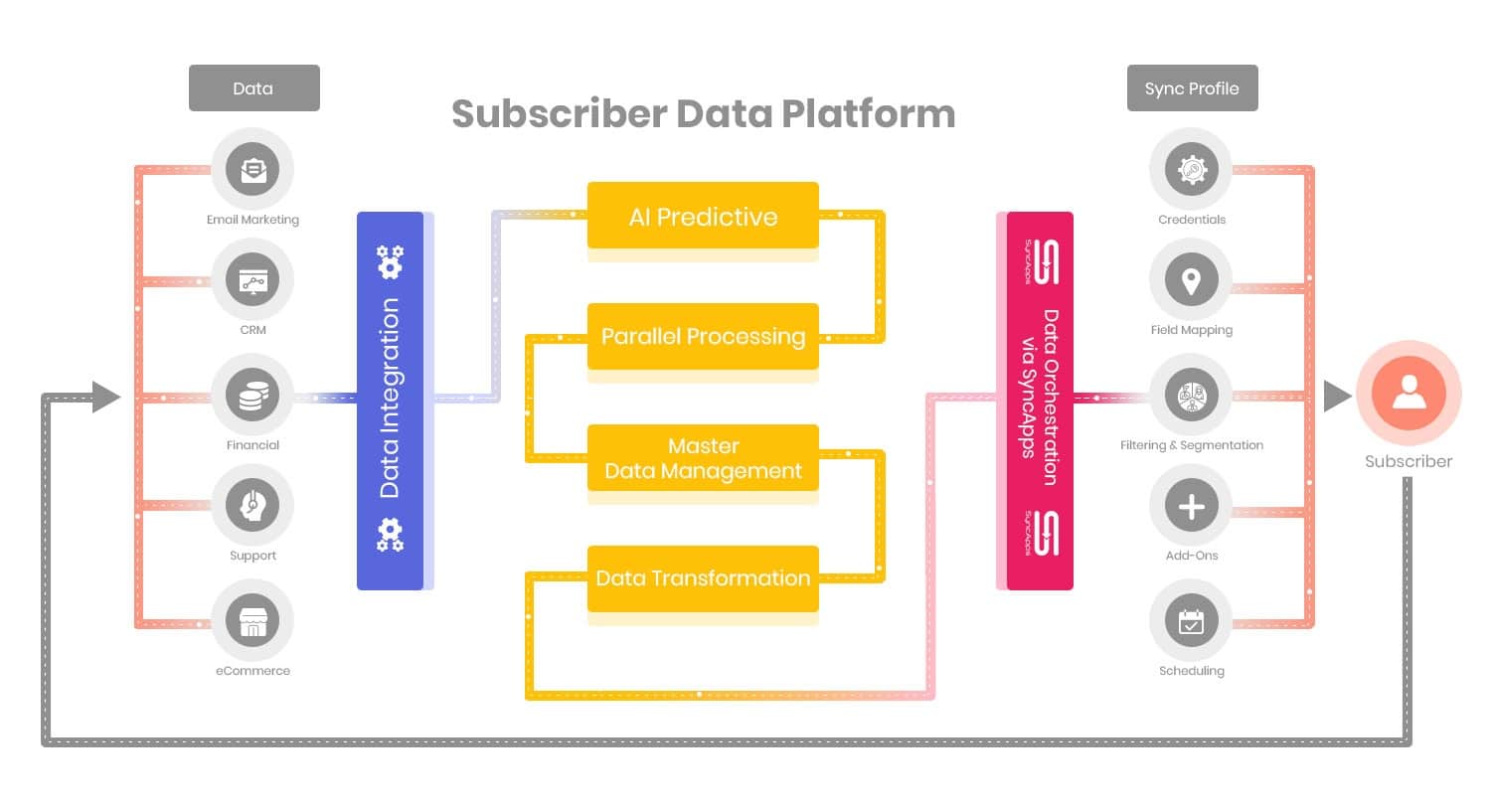
The Full Sync feature will power up your sales and marketing workflows by automating the process of removing records from your marketing software when your CRM records no longer match your syncing criteria.

The Full Sync can be scheduled to run Daily, Weekly, Monthly or done manually per integration.

True up your CRM and Marketing solutions efficiently.

Field Mapping

Basic fields such as Email Address, Name, Title, Address, Company Name, Phone Number, and Email Opt Out fields are already pre-mapped. Additional custom field mapping, field expression mapping, and overriding of fields like Email Address or Unsubscribe are available under "More Options".

Bidirectional updates of existing records or new records is easy to do in this step. Be sure to press Reset Sync Process after adding new field mapping so all your data will be re-synced with the new field mappings.

Filter & Segmentation

Filtering takes your records and filters them based on your chosen criteria.

Segmentation creates Tags, Groups or Lists automatically based on your filtering criteria. The use of Field Expression Mapping is supported. See some cool Filtering and Segmentation use cases here.

Sync Scheduling

Sync Scheduling can be set up to completely automate your integration, so you do not have to run it manually. Sync On-Demand is available to allow quick testing of your software's integration or to make it so you can manually run your automation.

Set the time it runs, day of the week, or any schedule you choose. If you want to sync your marketing metrics in real-time, then head to scheduling for this option.

About QuickBooks Online and Constant Contact integration
Integrate your QuickBooks Online data with your Marketing Automation platform!
  • Track the total number of subscribers on your books
  • Track progress on your most recent email campaigns
  • Keep track of your contacts and fans with a few touches
  • QuickBooks Online contact and customer details synced to Constant Contact
  • Never have to manually true up your customer lists again!

QuickBooks Online and Cazoomi deliver a new way to sync Constant Contact for optimal targeted marketing for your customers!

We provide a fully integrated solution for QuickBooks Online to Constant Contact with captured customer and contact data, from QuickBooks Online to Constant Contact.

Give your small business an edge with Constant Contact.

SyncApps Basics
Using SyncApps for segmentation and metrics

Join 25,000 Organizations that Grow with SyncApps

Manage your financial data, create better, data-driven campaigns, sell more, reduce your IT spend, and improve efficiency across all your departments. Start for free!

Tools that Fit Right In

Integration built to fit right into your business flow. You can customize, scale up or scale down anytime. Start automating and forget manual data work.

A Solution You Can Rely on

SyncApps has been in business for more than 12+ years. You can continue to rely on our dedication to innovation and our pledge to help you thrive!

Security Is Our Priority

All your data is secure with SyncApps. Our constantly reviewed and upgraded security policies are created to give you peace of mind. GDPR, CCPA, CASL and privacy policy-friendly, too!

World-Class Support

Whenever you need us, an integration expert is available to help you. Our support department is available 24/7.