Clint
is a marketing entrepreneur with over 25 years of experience and has successfully grown several 7 to 8-figure businesses. He is also skilled in using NetSuite and Salesforce. Currently, running Cazoomi for over 17 years and based in the Philippines.
9 minute read
Why Salesforce Campaign Members Are the Missing Link Between Marketing and Action
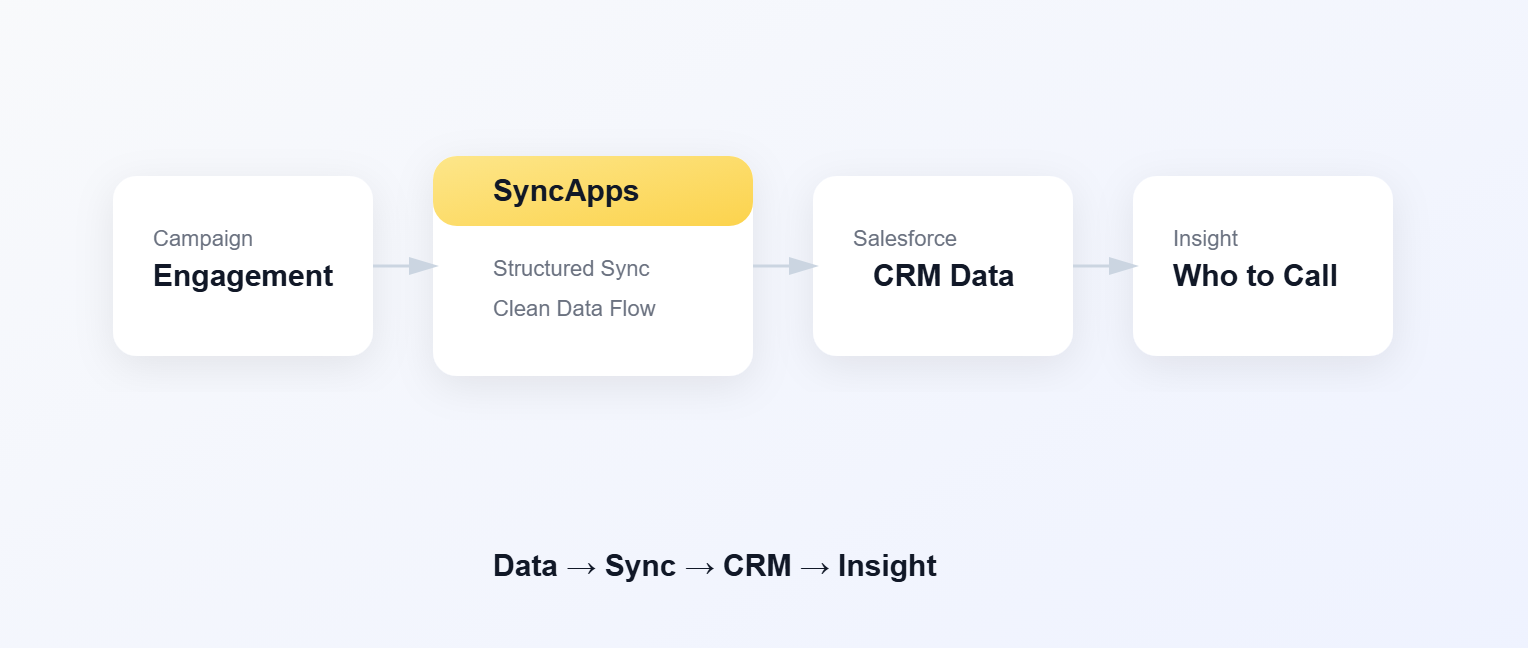
“Marketing sent a campaign to 40,000 people. Two days later, Sales asked a simple question: Who should I call? No one could answer it.”
This scenario plays out more often than teams like to admit.
Marketing did their job. The email went out. Open rates looked fine. Clicks came in.
But when it came time to turn engagement into action — sales calls, follow-ups, donor outreach — the room went quiet.
Not because the data didn’t exist. But because it lived in the wrong place.
The uncomfortable truth: engagement without context is useless
Email platforms are great at showing what happened:
Opens
Clicks
Bounces
Unsubscribes
But Sales teams and nonprofit teams don’t work in dashboards. They work in people records.
If engagement isn’t tied to who the person is, what campaign they’re part of, and what should happen next, it might as well not exist.
That’s where Salesforce Campaign Members come in — and where things often break.
The assumption that causes the most damage
Most teams assume this is true:
“If a Contact exists in Mailchimp, and that Contact exists in Salesforce, the systems will sort it out.”
They won’t.
Here’s the part that trips people up:
Mailchimp thinks in subscribers and Audiences
Salesforce thinks in Campaigns and Campaign Members
Those are fundamentally different models.
And the bridge between them — the Campaign Member — is where meaning either gets created… or lost.
What a Campaign Member actually represents (without the textbook definition)
In Salesforce, a Campaign Member is the moment a person meets a campaign.
It’s not just:
a Contact
a Lead
an email address
It’s the relationship between a person and a specific marketing effort.
That’s why Campaign Members are so powerful — and so misunderstood.
They’re where:
Marketing activity becomes visible to Sales
Engagement turns into prioritization
Reporting becomes trustworthy
If that relationship isn’t synced correctly, every downstream decision suffers.
Where things usually go wrong
Let’s go back to the original story.
Marketing sends an email from Mailchimp to 40,000 people.
Sales is working in Salesforce.
Here’s what should happen:
Campaign Members exist in Salesforce
Those Campaign Members sync to Mailchimp
Engagement comes back and updates the Campaign Members
Engagement syncs back to the same Campaign Members
Changes stay in sync over time
That last part is the one most teams underestimate.
One-time syncs are easy. Living systems are hard.
This is where most integrations start to fall apart.
How SyncApps Handles Salesforce Campaign Members with Mailchimp (The Important Distinction)
One important thing to understand about SyncApps is that not all Salesforce Campaigns serve the same purpose, even though they may look similar in Salesforce.
This distinction matters a lot when you’re working with Mailchimp.
1. Campaigns You Create to Sync Into Mailchimp
When you create a Salesforce Campaign and configure SyncApps to sync it to Mailchimp Groups or Tags, that Campaign acts as a source Campaign.
Here’s what happens:
You create a Salesforce Campaign
You add Campaign Members (Leads or Contacts)
SyncApps syncs those Campaign Members to Mailchimp
In Mailchimp, those members appear under the mapped Group or Tag
In this case:
Campaign Members flow from Salesforce → Mailchimp
Salesforce is the system deciding who belongs in the audience
This Campaign is about list management and targeting.
2. Campaigns Created When You Send an Email from Mailchimp
Mailchimp works differently.
In Mailchimp, you can send an email to any contact in an audience — regardless of how or why they were added.
When you send an email from Mailchimp, SyncApps treats that send as a new marketing event and does the following automatically:
Creates a new Salesforce Campaign
Uses the same name as the Mailchimp email campaign
Adds a Campaign Member in Salesforce for every Contact who was sent that email
Syncs engagement (opens, clicks, etc.) back to those Campaign Members
In this case:
Mailchimp is the source of the send
Salesforce is used for tracking and visibility
Campaign Members are created after the email is sent
This Campaign is about reporting and engagement, not list sync.
3. The Key Thing to Remember (This Is Where People Get Tripped Up)
The Salesforce Campaign you create to sync records to Mailchimp is NOT the same Campaign SyncApps uses when syncing email activity back from Mailchimp.
They serve different purposes:
Source Campaign → controls who syncs into Mailchimp (Groups / Tags)
Email Activity Campaign → records who was sent a specific Mailchimp email and how they engaged
SyncApps intentionally keeps these separate so Salesforce accurately reflects what happened, not just who was targeted.
Why This Design Matters (Especially for Sales and Nonprofits)
This approach ensures that:
Sales can see exactly which email a Contact received
Engagement is tied to the actual send, not a reused list
Nonprofits can track appeals, newsletters, and follow-ups separately
Reporting stays accurate even when Mailchimp sends to broad or mixed audiences
Trying to reuse the same Campaign for both list sync and engagement tracking would blur history and make reporting unreliable.
The Mental Model That Helps
A simple way to think about it:
Salesforce Campaign (syncing to Mailchimp) = Who we intended to reach
Salesforce Campaign (created from a Mailchimp send) = Who was actually sent the email
Both are valuable — they just answer different questions.
Why This Ties Back to “Who Do I Call?”
Because when SyncApps creates Campaign Members for each Mailchimp send:
Sales can filter by who received and engaged
Nonprofits can see which supporters responded to a specific appeal
Engagement finally lives where decisions are made — on the Campaign Member
That’s what turns email activity into action.
If you ever see more Campaigns in Salesforce than you expected, it’s usually not duplication — it’s history being preserved.
Where SyncApps fits (without the marketing B/S)
This is where SyncApps comes in — not as a magic layer, but as a control layer.
SyncApps doesn’t change how Salesforce or Mailchimp work.
It does three unglamorous but critical things:
Respects Salesforce Campaigns, List Views or Segmented records as the driver
Keeps Campaign Membership aligned across systems
Writes engagement back to the right Campaign Member
That’s it.
But that “that’s it” is the difference between:
dashboards that look good
and systems people actually trust
The failures we see most often (and why they happen)
After years of watching real syncs, a few patterns show up again and again.
1. Engagement exists, but no one can act on it
Because it’s not tied to Campaign Members.
2. Sales sees activity, but not which campaign
Because engagement was logged generically.
3. Nonprofits see opens, but can’t connect them to donations
Because Campaign history is incomplete.
These aren’t edge cases. They’re default outcomes of loose integrations.
A quiet but important decision: source of truth
Here’s the line we repeat most often:
Pick one system to decide who belongs in a campaign.
If Salesforce is your CRM (and for most teams, it is), then:
Salesforce should decide Campaign Membership
Mailchimp should execute messaging
Engagement should flow back
The moment Mailchimp starts deciding membership independently, reconciliation becomes a full-time job.
Back to the original question
Let’s return to that meeting.
“Who should I call?”
When Campaign Members are synced properly:
Sales filters by clicked in last 48 hours
Nonprofits filter by engaged but hasn’t donated
Marketing proves impact without exporting spreadsheets
The question gets answered — quickly.
Not because Marketing worked harder. But because the systems finally agreed.
The takeaway (and it’s not a feature pitch)
If there’s one thing to remember, it’s this:
Email engagement only becomes valuable when it’s attached to a person, a campaign, and a next step.
That’s what Campaign Members are for.
If your current setup can’t answer simple questions from Sales or fundraising, the issue isn’t effort — it’s alignment.
Fix the relationship between people and campaigns, and the rest starts to make sense.
If this question keeps coming up internally — “who should I call?” — it’s usually a sign that engagement data isn’t landing where decisions are made. That’s the gap SyncApps is designed to close.